Artificial intelligence (AI) is rapidly transforming the way we live and work. From self-driving cars to virtual assistants, AI is changing the way we interact with the world around us. As AI becomes more widespread, it is important to consider the role of design in this new era. Design is the process of creating products and services that are both functional and aesthetically pleasing. In the context of AI, design can help to ensure that AI systems are user-friendly, reliable, and ethical.
Interface Design for Artificial Intelligence
Effective UI design for AI interfaces is heavily reliant on the creation of thoughtful feedback loops that build trust through transparency. This involves creating clear visual cues when a platform is processing information, providing confidence indicators for machine learning-generated results, and explaining the systems decisions in user-friendly language. These feedback mechanisms help users develop appropriate trust in the system—neither over relying on AI capabilities nor dismissing valuable AI assistance due to mistrust.

Ready to have a conversation?
Contact our AI/ML development
team by filling out the form below!
The Keys to Designing AI Tools

When designing for AI tools, you need to create interfaces that support natural, conversational interactions without feeling mechanical or rigid. This means implementing chat interfaces with appropriate response timing, visual cues that show when the AI is “thinking,” and interfaces that can handle multi-turn conversations. The design should feel intuitive and human-like, with nuanced affordances that guide users without confusing them. Typography, spacing, and visual hierarchy all play crucial roles in making conversation flows readable and scannable, allowing users to easily reference previous exchanges while continuing the dialogue naturally.
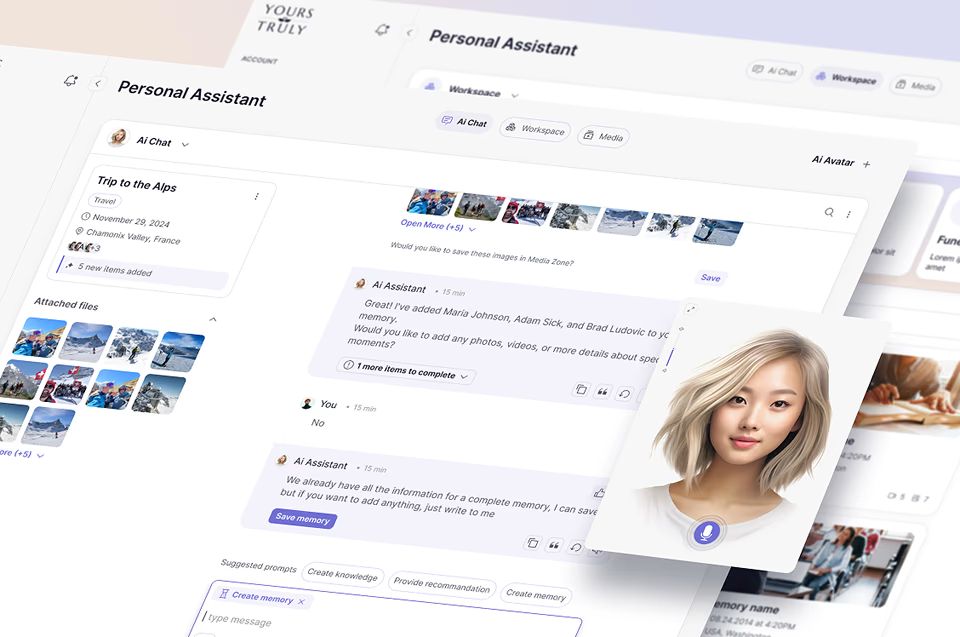

Transparency in AI interfaces builds trust by helping users understand what the system is capable of, how it works, and why it produces specific outputs. Design elements should clearly communicate the AI’s confidence levels, data sources, and reasoning processes behind recommendations or decisions. Progress indicators are essential for longer processing services, or tasks, while subtle animations can signal when the AI is listening, thinking, or ready for input. These feedback mechanisms help set appropriate expectations and prevent user frustration when systems have limitations or need time to process complex requests.


UX UI design AI for these unique systems will inevitably make mistakes, so we are always making room for and attempting to gracefully handle errors and provide clear paths to recovery. This includes designing for edge cases where the platform misunderstands input, provides incorrect information, or cannot complete a task. Effective error states should avoid technical jargon, explain what went wrong in user-friendly language, and offer actionable next steps or alternatives. The design should make it easy for users to correct the suggestions, provide clarification, or retry their request with modifications, maintaining a sense of control throughout the experience.
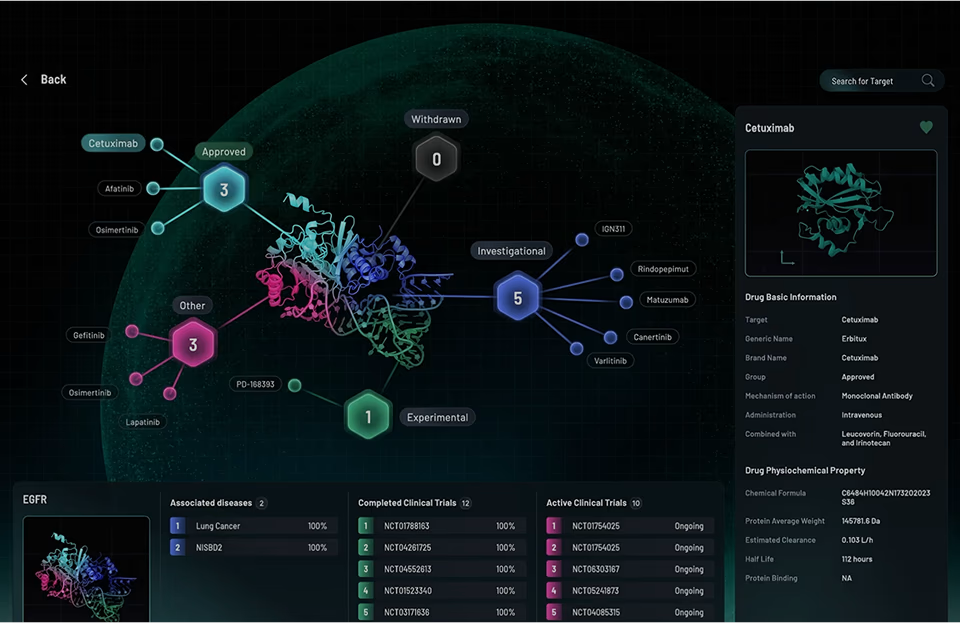

Artificial intelligence tools often have complex capabilities that can overwhelm users if presented all at once or in ways that don’t seem to make sense for the non-tech-savvy person. Progressive disclosure techniques help introduce features gradually as users become more familiar with the system. Our designers attempt to provide clear entry points for beginners while allowing power users to make great use of advanced functions when needed. This might include a simple getting-started experience that highlights core features, followed by contextual tips that reveal additional capabilities as users demonstrate readiness. Thoughtful onboarding flows can showcase what’s possible without overwhelming users with technical possibilities.
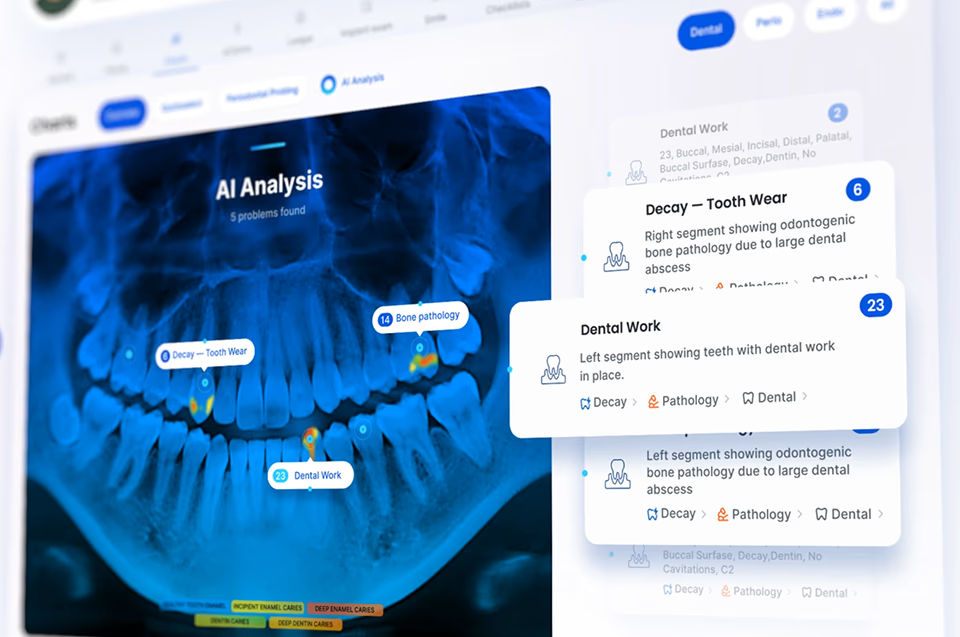

Even with advanced capabilities, really skilled designers create AI for UI design in such way that users are handed a sense control over their experience that is not very common. Design interfaces that allow users to customize this unique technology’s behavior, override suggestions, edit generated content, and set preferences that persist across sessions. Controls should be accessible but not obtrusive, giving users agency without forcing them to micromanage the system. This balance is crucial – too many settings create cognitive load, while too few leave users feeling at the mercy of opaque algorithms. Consider offering layered control, from simple toggles for casual users to detailed configuration options for experts.
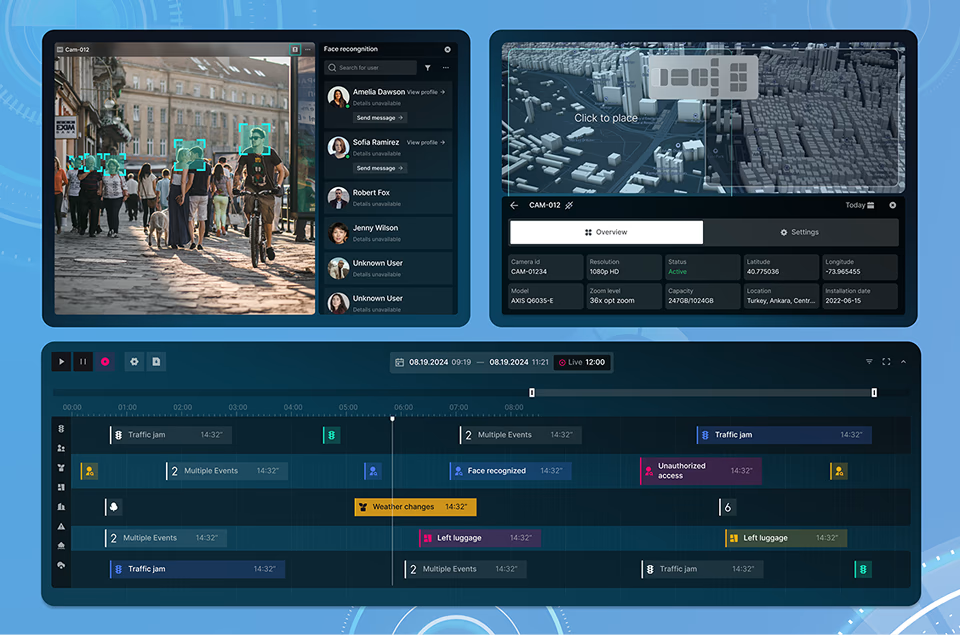
AI Interface Design
Services

Conversational Interfaces
AI web UI design in the digital conversational paves the way for users users to interact with AI through natural language, either via text or voice. Examples include chatbots, virtual assistants (like Siri or Alexa), and messaging platforms with AI integration.

AI User Interface Design
This type of design discipline includes AI capabilities in combination with user input. Intelligence-generated suggestions are paired alongside user produced custom content. Examples include writing assistants that provide text completion suggestions, design tools with AI-generated layout recommendations.

Adaptive/Personalized Interfaces
These interfaces dynamically change based on user behavior. Examples include news feeds that adjust content priority based on reading habits, and e-commerce interfaces that customize layouts based on shopping history.

Ambient Intelligence Interfaces
These AI-based app UI designs blend seamlessly into platforms often requiring minimal direct interaction. Examples include smart home systems that adjust lighting and temperature based on presence, wearables that monitor health metrics.

Multimodal Interfaces
These interfaces combine multiple input and output channels (voice, text, gesture, visual) to create more flexibility. Some examples include AR/VR applications with voice, gesture and visual controls, and design software that accepts sketching, voice commands, and traditional inputs.

Transparent AI Interfaces
This is an area Fuselab is working on with many clients with intelligent chatbots, and decision making tools become more widely available. Healthcare providers can immediately see the reasoning behind recommendations, backed up by data and visualizations.
Designing Effective Human-AI Interaction
AI challenges traditional interactions by introducing new channels like voice commands while also offering opportunities to simplify user interfaces by preventing users from feeling like they have too many choices and jump ship because they are completely overwhelmed with options.

Building up trust with a user is super important for effective Human-AI interactions to take place. Designers need to determine how transparently communicate what the system can and cannot do through the interface. Always attempting to explain, or in some way show how AI arrives at decisions, and where data comes from, and providing appropriate feedback mechanisms are all huge assets in the overall experience for the everyday user.

For most designers, understanding of what AI systems can and cannot do is more important than anything else. A crucial aspect of AI interface design is to clearly communicate what’s possible through the interface. This will help set appropriate expectations and hopefully prevent frustration or abandonment. Our designers always work closely with our AI engineers to understand the technical constraints and opportunities of the systems they’re designing for.

Striking a careful balance between automation and user’s controls requires expertly designed systems to automate repetitive tasks while preserving user control for meaningful decisions. It comes down to treating UI components as “function calls” that give AI systems a visual state space to work within. Fuselab designers routinely create interfaces that let AI handle common work processes while empowering users to guide, override, and customize AI behavior.

The closer we can get to producing natural interaction patterns the more intuitive AI interfaces feel and function. For voice-based AI interactions, designers must understand user language habits and preferences, implement natural voice commands. There will always be some errors, at least for now, but how smoothly and consistent the AI personality remains the better the experience will be. Similar principles apply to text-based conversational interfaces, which require careful attention to dialogue jargon.

AI interface design requires unique methodologies that others don’t. The process typically involves determining the interface structure where results will appear, testing prompts to understand data output, validating the interface based on results, and iteratively refining both prompts and interface elements. This approach acknowledges that problems can pop up anywhere in the designed flow. The nature of AI outputs is different in that it requires more flexibility and attention to the tiniest details, as opposed to many of our traditional UX design processes.

This is a super popular subject in the Artificial intelligence design space. Our designers incorporate user-centric privacy features, strictly adhere to data privacy regulations, prioritize user consent and transparency at all times, and avoid manipulative design patterns that could harm or insult users. This kind of awareness includes designing with an authentic understanding of potential biases in AI systems and implementing appropriate safeguards to protect users and our client’s from receiving pushback from their target market or anyone else for that matter.
Our Work Examples
Latest projects




Al Design and
Development Simplified
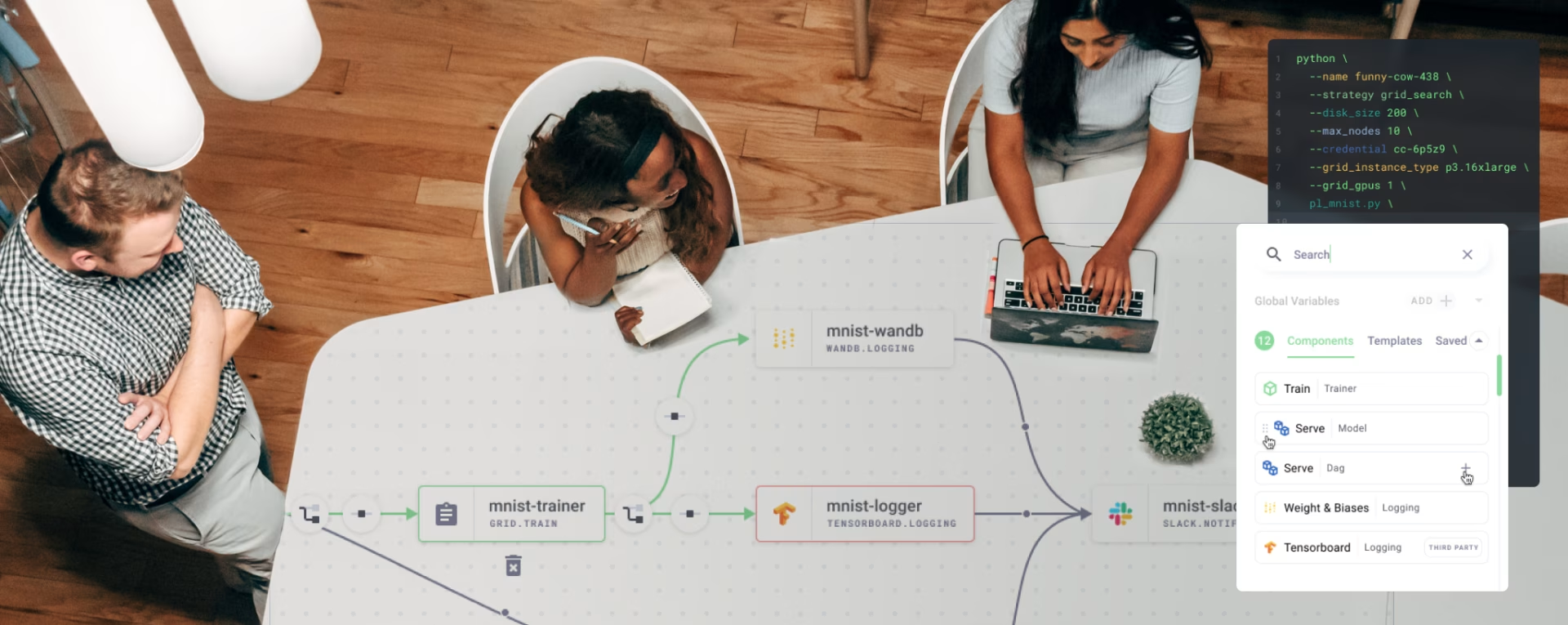
The six processes outlined below give a high-level summary of what is involved in designing and developing digital products using AI to increase efficiencies and streamline activities that used to be extremely time consuming.

Key activities in this phase include:
- Using AI tools to analyze market research data and identify underserved needs and areas that are viewed as a ubiquitous need among particular communities
- Employing AI to process user interviews and feedback at scale
- Creating data-driven user personas with AI assistance
- Mapping pain points where AI can provide unique solutions
- Determining which aspects of the user experience can benefit most from AI enhancement

This phase includes:
- Using generative AI to explore multiple design directions in minutes
- Analyzing successful competitors with AI-powered competitive analysis tools
- Developing user flows enhanced by AI predictions and digitally tracked user behavior
- Creating mood boards and visual language with AI image generation
- Defining the appropriate AI capabilities needed in your product (e.g., personalization, prediction, automation)

This step involves:
- Converting sketches, goals and project parameters to digital wireframes with AI conversion tools, such as Khroma
- Using AI for UI UX design components development based on approved wireframes
- Creating multiple interface variations with AI assistance
- Implementing conversational interfaces or voice UI elements where appropriate
- Developing a clickable prototype that utilizes the most common or critical user flows listed in original requirements

Key activities include:
- Running AI-powered usability tests that track user interactions, focusing on commonly sighted pain points
- Implementing A/B testing at scale with AI analysis of results
- Using sentiment analysis to process user feedback
- Testing AI components with real data to evaluate accuracy and performance, and use actual users as testing group to get real world responses
- Identifying potential biases or accessibility issues in AI-driven features

This step includes:
- Generating code from finalized designs using AI coding tools
- Implementing AI models that power the product’s intelligent features
- Creating adaptive interfaces that respond to user behavior patterns
- Developing appropriate feedback mechanisms that explain AI decisions
- Building in user controls for user generated customization using AI behavior tracking/analysis
- Establishing data pipelines that allow AI components to learn and improve over time

Activities in this phase include:
- Implementing analytics that track AI performance and user satisfaction
- Creating flexible feedback loops that improve AI features based on usage and unique feedback types, such as voice
- Monitoring for bias, errors, or unexpected behaviors in AI systems
- Regularly updating training data to improve AI capabilities
- Evolving the interface based on changing user expectations and needs
- Developing a governance framework for responsible AI use
AI/ML
Implementation in
Industries
One of the keys to understanding AI/ML and how to utilize this technology within any industry is to first realize that this is an advancement that is in a state of constant evolution. The good news is that its trajectory is one of consistent added value to users with each passing day.

POGO
US Government Covid-19 spending portal design and development
Automatize
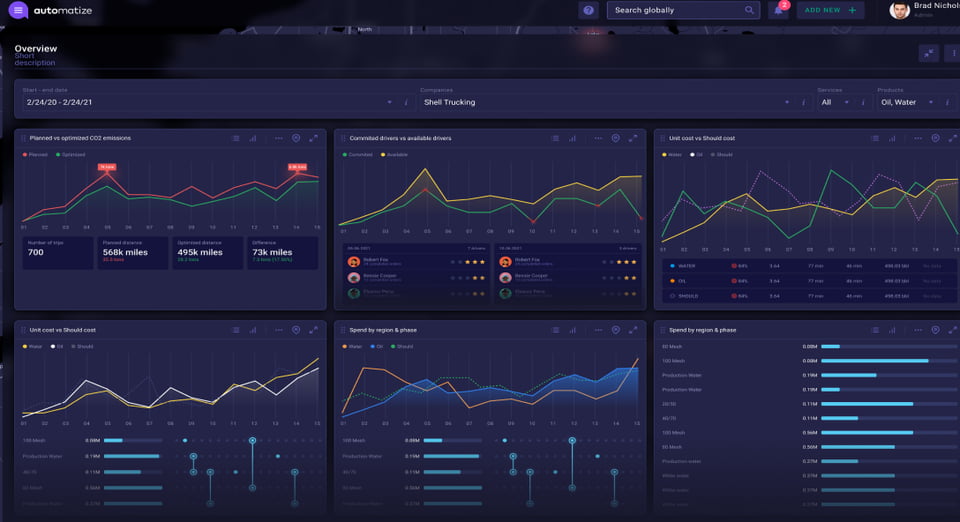
Redesign the user interface for supply chain software company
User Consent
Designers must create interfaces that make privacy policies accessible and understandable rather than buried in legal jargon, allowing users to make informed decisions about their data. Who hasn’t signed a consent form online before downloading an app, right? This can’t continue when it comes to AI that has access to personal data. The new process needs to include implementing clear opt-in mechanisms rather than relying on pre-checked boxes or confusing language, providing contextual explanations of data usage at relevant moments, and giving users the ability to revoke consent at any time. The goal is to build trust by ensuring users never feel misled about how their information is being used to power AI features.

Data Protection
Data minimization and protection principles are an exercise in the age old healthcare motto, “first do no harm.” We attempt to collect only the data absolutely necessary for our future AI system to function effectively while implementing solid safeguards against breaches or the often overlooked threat of misuse. Our designers incorporate user-centric privacy features and spend significant time and effort adhering to data privacy regulations, prioritizing user consent, transparency, and control over personal data throughout the design process.
Protecting Against Bias
Algorithmic bias and fairness is a prickly pear to address. This type of oversight requires designers to actively identify and mitigate biases that can easily become embedded in AI systems through different types of data training and/or algorithmic design choices. There’s some growing thought or consensus that artificial intelligence involves investing in unbiased data, but this is no easy task. Data is the central foundation for all AI systems, and if it is not free from Bias, we all will ultimately suffer the consequences. We require that our designers create interfaces that don’t just present AI recommendations as neutral but acknowledge issues or problems with the recommendations and provide ways for users to report outputs they feel are tainted in some way.
Accountability
Accountability and governance frameworks add a human control element back into the world of AI. These structures ensure that clear responsibility structures exist for AI platforms, with easily understood functionality built into the user flow for addressing issues when they pop up. Users also need to fully understand how decisions are made by the AI, providing simple explanations; in other words, keeping all of this information as transparent as possible. The trick is to create interfaces that clearly indicate when AI is being used, provide appropriate confidence levels for AI-generated content, and establish clear channels for users to push back or dispute decisions and the offer a way to flag concerns at all times.

Demystifying AI
and ML Design
and Development
What's some differences between designing traditional digital products versus AI-powered products?
The key difference is how we approach designing for deterministic versus probabilistic outcomes. Traditional digital products usually have predictable behaviors—the same input fairly reliably produces the same result. However, with AI-powered products or services, such as creating an AI dashboard UI design, they deal with probabilities and may produce different outputs from identical inputs depending on context, training data, or even timing. In other words, they can produce real time results instead of formulaic ones. This fundamental difference requires designers to create interfaces that communicate confidence levels, explain AI limitations transparently, and provide human-centered fallbacks when AI components produce unexpected or confusing results.
How do you effectively communicate what an AI system is capable of without creating unrealistic user expectations?
Setting appropriate expectations begins with simple and transparent communication with users about the we’ve built and the AI system’s assets or capabilities, along with, and possibly most importantly, its limitations. Try to avoid language that feels like promotion of the system and instead focus on common human understanding. When your content includes terms or phrases such as “intelligent,” “smart,” or “understands you,” you’ll create expectations that invariably the AI tool will end up falling short on. The better route to follow is to be specific about what tasks the system can perform and under what conditions it performs best. Create onboarding experiences that demonstrate practical use cases rather than theoretical capabilities. And again, as we have stated across this page, give users with appropriate control mechanisms that allow them to override, refine, or reject recommendations, which will help position your system as a very helpful tool but not something to completely replace human decision making.
What data considerations are most critical when designing AI-powered features?
Commit this to memory, as it essential to understand that data quality is far more important than quantity when designing AI tools and systems. Begin by critically examining your data sources for biases, gaps, and quality issues before building any features. In other words, clear your cache of mistakes before going forward, as anything not addressed in the foundation stage of your design and development will only fester over time. Ask yourself, does my data include diverse user groups and scenarios that match your target audience? Always implement robust data governance practices, including clear ownership, proper consent mechanisms, and transparent privacy policies that explain how user data is used to train or improve these systems. It’s helpful at times to start small, and design features that can function reasonably well with limited initial data and improve gradually as more data is added to your set. Finally, create interfaces that make data collection processes visible to users and provide clear value exchanges—explaining how sharing certain data improves their experience while always making sure to give the user absolute control over what they are being asked to share.
How do you effectively test and evaluate AI components of a digital product?
We all know how important ongoing user testing is when building new digital products. Testing AI components requires moving beyond the QA methods we have come to rely on in the past. Now our digital world is different and we need to include evaluation of statistical performance and real-world usefulness along with general usability. It’s a good idea to start by establishing clear performance metrics or some kind of goals tied to user outcomes rather than technical measurements alone—accuracy matters less than whether the AI helps users accomplish their goals effectively. And above all don’t get lazy. Create a process for the continuous evaluation systems that monitor performance after deployment, and watch out for degradation or drift as user’s engagement patterns change. As we have stated previously, but will say again here, develop clear processes for handling user feedback specifically about AI components, creating direct pathways to improve models based on real-world usage patterns and identified areas where things have somewhat veered off course.
How should designers balance automation with user control in AI-powered interfaces?
The most successful AI interfaces find just the right balance between automation and user understanding by following the fairly universal concept of all artificial intelligence as a support mechanism and the human user as the decision maker. If you’re looking to create efficiencies in your organization we suggest picking out tasks that are repetitive, tedious, or require processing volumes of data—these are, as of now, the best and most productive areas for AI to address and support your goals. Task that require some form of creativity or personal touch, these are still not your best bet in terms of platform support, so let’s leave these for the living and breathing for now. Finally, take baby steps at first remembering that effective interfaces build trust gradually—starting with small amounts of automation and then building on these incremental plateaus as confidence users become comfortable with your AI’s capabilities and limitations. This approach leads to a reasonable rate of adoption rather than blowing the doors off with some kind of unbelievable level of automation.
Read Our Blog
Inspiration and knowledge to fuel your creative journey.